
WordPress.com Rolls Out GeoTagging Feature

WordPress.com’s free blog hosting site has just rolled out geotagging of posts. This opt-in feature allows you to identify your location whenever you write a post.
Enabling this feature your blogs can be done either automatically by WordPress.com or you can set it manually yourself.
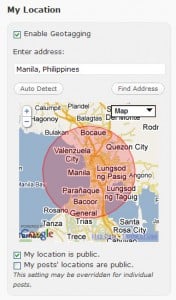 Aside from geotagging your post, the new feature also lets you tag your profile. This will give you a quicker way of finding other WordPress.com bloggers near your area.
Currently the geotagging feature is useful only for search engine purposes. Geotagging your posts helps search engine identify your location and deliver location-specific search results identifying your blog posts if you’ve turned on the geotagging feature.
This is of course in preparation for WordPress.com’s Geo Search feature which will harvest the geotagged posts and profile of all WordPress.com users who will use the feature right now.
To enable geotagging of posts on your WordPress.com, you need to enable it on your WordPress.com profile. Once this is set, you can start using the feature the next time you put up a blog post.

It’s a pretty cool feature, especially in times when geo-location, location-aware services are becoming the norm among online services.
Hopefully, the Geo Search feature comes out soon, as this would encourage WordPress.com users to use the geotagging feature.

They should release a plug in for this self hosted WordPress users.
I would like to place your content on Russian sites and as on my site http://lowol.ru, c the reference to your blog, Having translated into Russian
the articel is intersting……is good for me
very nice post
Seems like the plugin will be awesome for .com. It will be exciting when it is released for self hosted WordPress sites.
good read thanks a lot for the share and very nice website